
Own productWe designed, built and operate it ourselves.
Popup Pal
Event software we designed, built and run ourselves, from the first trader application to the gate on show day
- What it is
- Web software for organisers of markets, fairs, trade shows and exhibitions: trader applications, stall invoicing, ticketing, floor plans and show-day tools.
- Our role
- All of it. Product, design, engineering, payments integration, operations and support.
- Period
- Second version of the product. The current codebase was started in July 2026 and work continues.
- Status
- Live at popuppal.com and in active development.
All project details
- Type
- Own product. Popup Pal is a trading name of CODEHARDY LTD.
- What it is
- Web software for organisers of markets, fairs, trade shows and exhibitions: trader applications, stall invoicing, ticketing, floor plans and show-day tools.
- Our role
- All of it. Product, design, engineering, payments integration, operations and support.
- Platform and stack
- Web only, with no native apps. One Next.js and TypeScript application on Vercel, PostgreSQL on Neon through Prisma, Stripe Connect for payments, Resend for email, Sentry for error monitoring.
- Period
- Second version of the product. The current codebase was started in July 2026 and work continues.
- Status
- Live at popuppal.com and in active development.
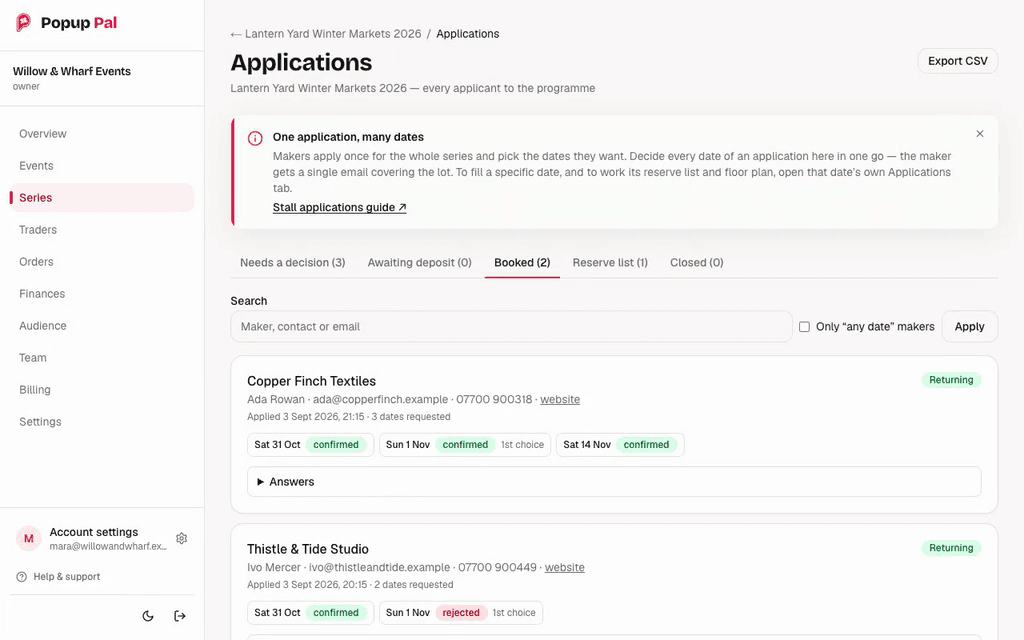
One application, many dates
A trader applies once for the whole series and picks the dates they want, instead of applying event by event.
Tabs by stage
The inbox is grouped into needs a decision, awaiting deposit, booked, reserve list and closed.
Every date gets its own outcome
Each requested date is confirmed or rejected separately. The second card shows one date confirmed and one rejected. The notice on screen says the trader gets a single email covering every date.
The problem
Organisers of markets, fairs, trade shows and exhibitions run their trader admin across forms, email, spreadsheets and bank transfers. General ticketing platforms sell the visitor tickets but usually leave out the trader side: applications, stall fees, documents and pitch allocation.
We built Popup Pal to put that work into one organiser workflow, from opening applications to show day. It is our own product. We decide what goes into it, design it, build it, run it and answer the support requests.
Two constraints shaped the build. Organisers keep the commercial relationship, so card payments for tickets and stalls go directly to the organiser's own Stripe account and Popup Pal never holds event money. Buyers should not need an account or an app to buy a ticket, and staff should not need an app or hired hardware to scan one. So buyers check out as guests, and signed-in staff scan from a phone browser.
Who owned what
What CodeHardy was responsible for
- Product decisions, pricing and the documentation.
- Interface design for the organiser dashboard, the trader workspace and the public event, checkout and order pages.
- All engineering: one Next.js application, the PostgreSQL schema, scheduled jobs and the test suite.
- The Stripe Connect integration: connecting organisers' accounts, direct charges, application fees, refunds and webhooks.
- Hosting, deployments, error monitoring, and separate staging and production environments.
- Organiser support, and the internal admin tools used to provide it.
- The move from the first version of Popup Pal, including redirects from its old URLs.
What organisers and payment providers own
- Organisers are the seller of record for their tickets and stalls. They set prices, refund policy and entry rules.
- Organisers decide which traders to accept, what each stall costs and which pitch each trader gets.
- Organisers hold their own Stripe account. Card payments for tickets and stalls land there, and their data can be exported.
- Stripe processes the card payments and pays out to the organiser.
What made it hard
Money moves through organisers' own Stripe accounts
Every card payment for a ticket or a stall is a direct charge on the organiser's connected Stripe account. One webhook signing secret covers every connected account, so a valid signature proves which endpoint was called, not which account an event belongs to. Events also arrive out of order and more than once. The handler ties each event to the session ID, amount and currency we stored at checkout, and settlement is a single idempotent function, so a repeated or early event does not issue tickets twice.
Several phones scanning at one gate
Several staff can scan at once, each on their own phone. Two scanners can hit the same ticket in the same moment, an event can be cancelled while the queue is moving, and a day pass has to reset on the day boundary of the event's own timezone. Admission runs on the server inside a database transaction that locks the ticket row. Integration tests against a real PostgreSQL database cover simultaneous scanners, and a scan that was queued before a cancellation and sent after it.
One application across many dates
For a series of markets, a trader applies once and picks the dates they want. Each date then carries its own decision, reserve list and floor plan, while the trader still receives one email covering every date and can be sent one invoice across several of them. An offer becomes a booking when the deposit is paid, and the balance invoice follows automatically. Invoice numbers are allocated under a PostgreSQL advisory lock, so two offers paid at the same moment on different events cannot be given the same number.
Replacing the first version without breaking its links
This is the second version of Popup Pal, a rebuild of an earlier product. The migration script runs as a dry run unless told otherwise, can be re-run safely because records are keyed on their old IDs, and deliberately leaves historical orders and payments in the first version's archive. Old URLs from the previous application, its separate docs site and an earlier website are redirected or return 410 Gone.
What we built
Trader applications and documents
Organisers build an application form with their own questions, conditional questions and file uploads. Traders can save a draft and come back to it. Applications land in one inbox, existing applications can be imported from CSV, and returning traders are flagged. Organisers review certificates and insurance documents, and reminders go out before a document expires.
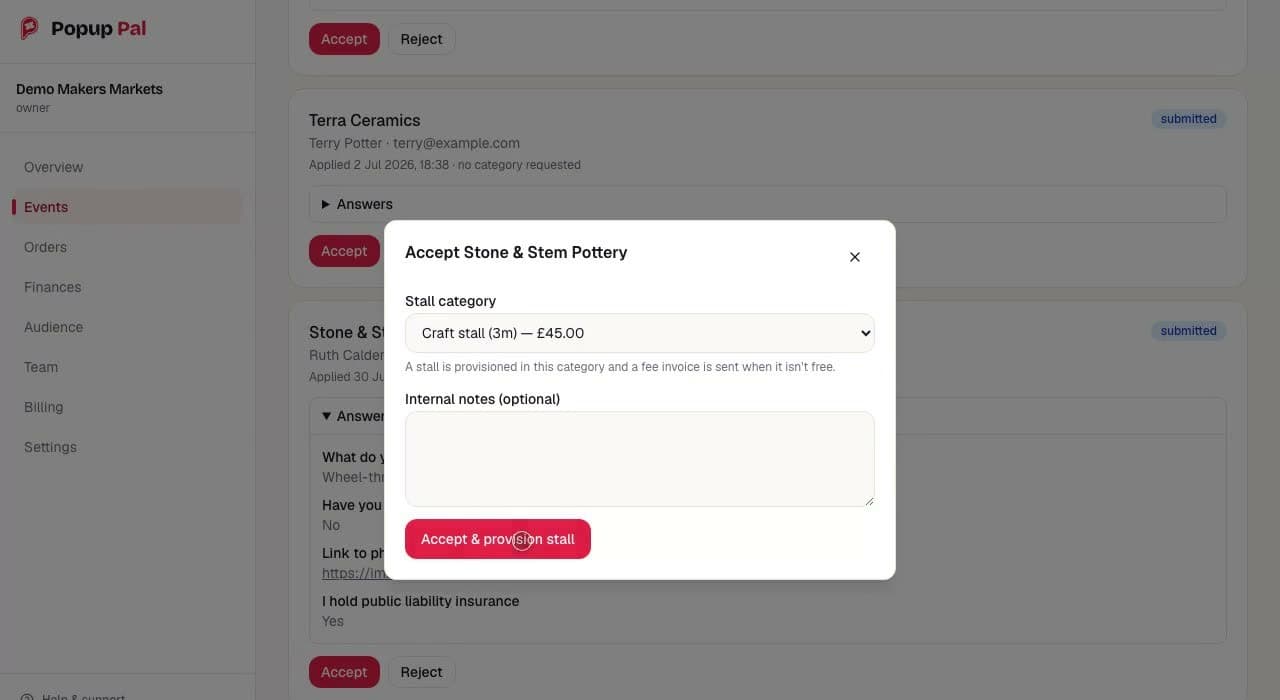
The decision sets the price
Accepting a trader means choosing a stall category, here a 3 metre craft stall at £45.00.
The invoice follows from the decision
The helper text says a stall is provisioned in this category and a fee invoice is sent when it is not free.
Answers stay with the application
The trader's answers to the organiser's own questions sit on the application card, including whether they hold public liability insurance.
Stall offers, invoices and payments
Accepting a trader assigns a stall category and price. An offer can convert on a fixed or percentage deposit, with the balance invoiced automatically and unpaid invoices chased. Each numbered invoice has its own secure pay link. Card payments go to the organiser's Stripe account, cash and bank transfers can be recorded by hand, and Popup Pal takes no percentage of stall fees.
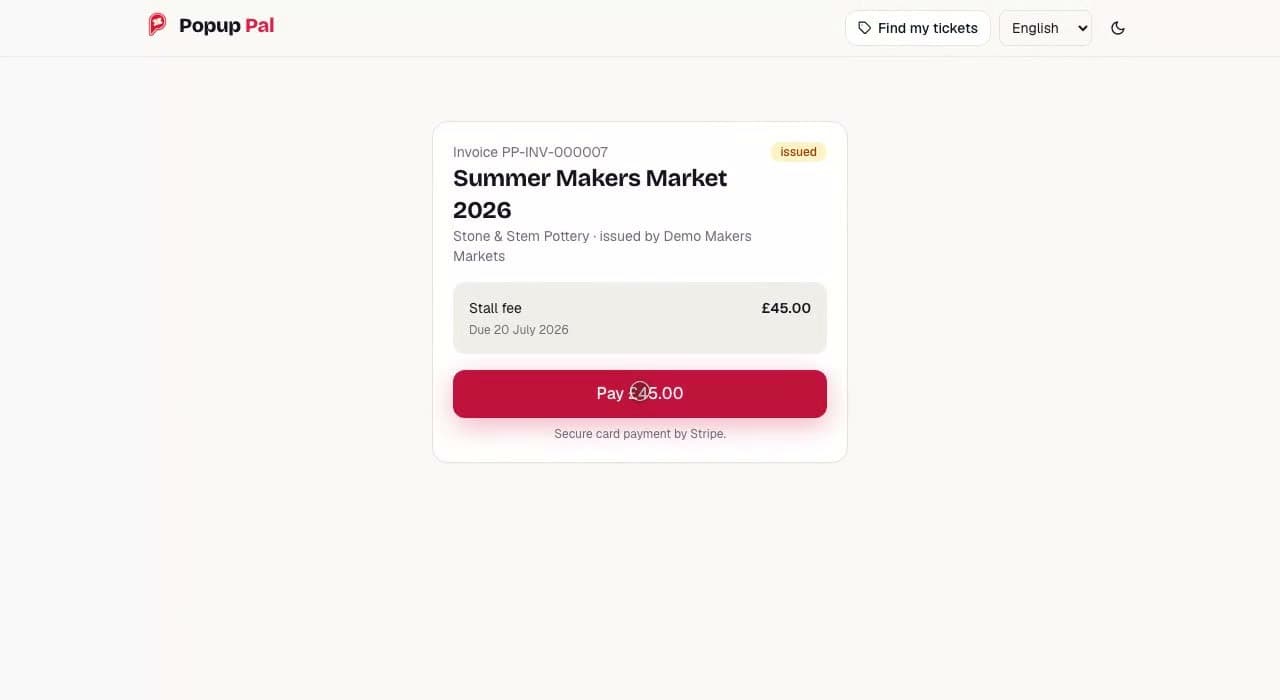
The link is the credential
Each numbered invoice has its own pay link, authorised by a 256-bit random token in the URL. The page has no sign-in step.
Issued by the organiser
The invoice names the organiser as the issuer. The card payment is a direct charge on the organiser's connected Stripe account.
Card payment by Stripe
The page states that card payment is handled by Stripe. Popup Pal takes no percentage of stall fees.
Ticketing with guest checkout
Each ticket type carries its own price, capacity, per-order limit and sale window. Organisers can add checkout questions, add-ons, discount codes and waitlists. Buyers never create an account. The link in their confirmation email opens their order, where they can show QR tickets, add the event to a calendar, forward a ticket or request a refund.
Floor plans and show day in a phone browser
A drag-and-drop editor lays out pitches, walls, doors and labels, starts from layout presets, and produces a print and share view for the setup crew. On the day, ticket scanning, door sales and trader check-in run in a phone browser. There is no native app and no scanner hardware. Entry rules can be single entry, once per day or re-entry, and door sales record cash, card and complimentary tickets.
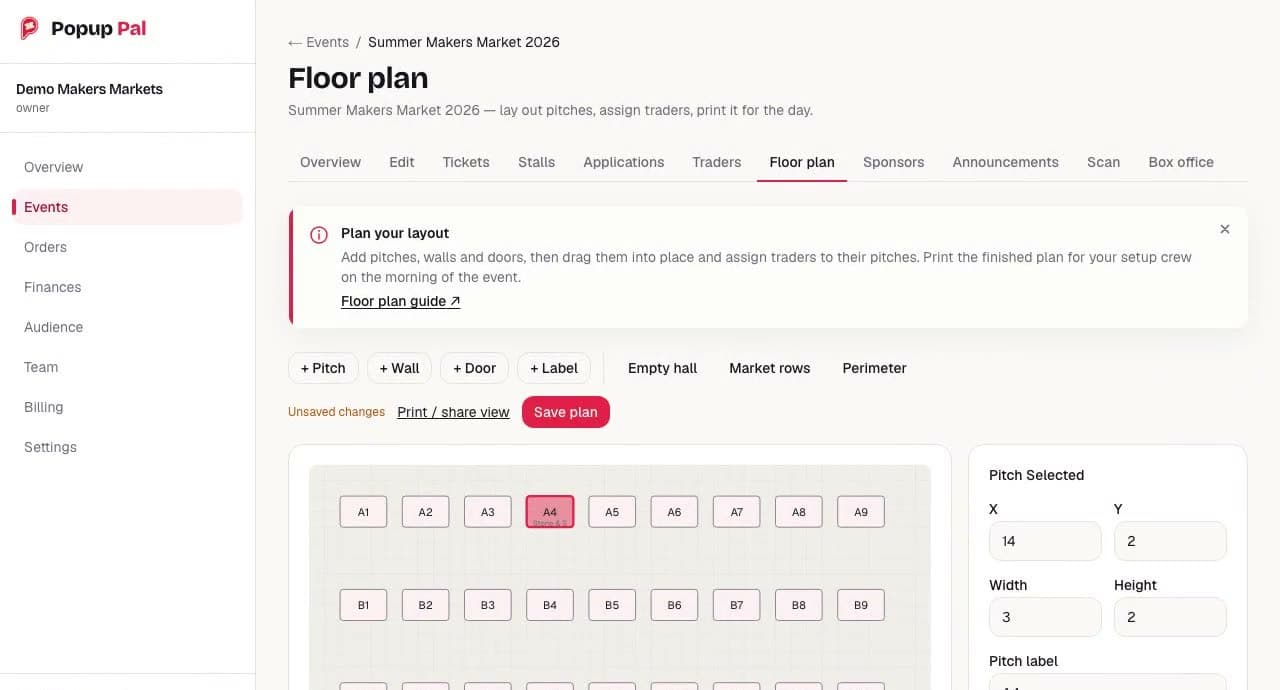
Tools and layout presets
Pitches, walls, doors and labels are added from the toolbar. Empty hall, Market rows and Perimeter give a starting layout.
Print and share view
The plan has a print and share view. The notice on screen says it is for the setup crew on the morning of the event. Unsaved changes are flagged next to the save button.
Traders are assigned to pitches
The selected pitch, A4, shows the start of the assigned trader's name under its label. Its position and size are edited in the panel on the right.
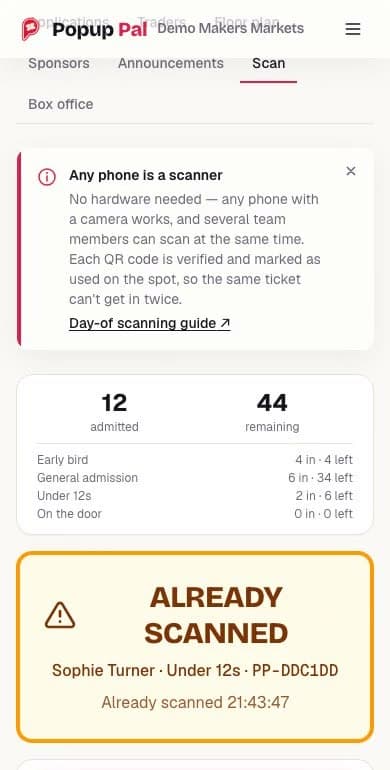
Any phone with a camera
Scanning runs in the phone's browser. There is no app to install and no scanner to hire, and several staff can scan at the same time.
Counts by ticket type
Admitted and remaining totals are shown for the event and for each ticket type.
A second scan is refused
The server checks the signed QR code and records the admission inside a database transaction that locks the ticket, so two phones scanning the same code cannot both admit it.
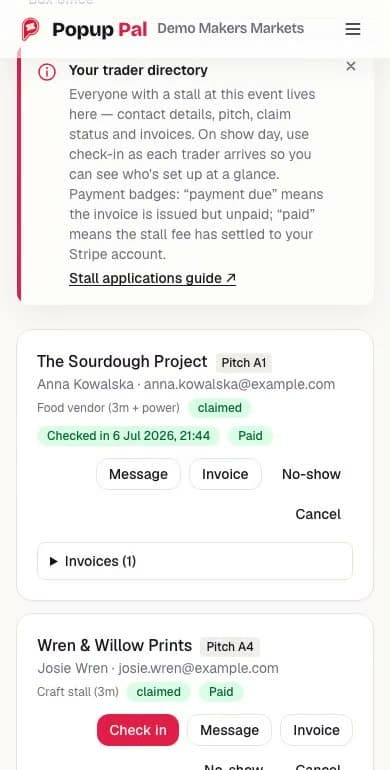
Checked in, with a time
Each trader is checked in as they arrive, against the pitch they were given on the floor plan. A trader who does not arrive can be marked as a no-show.
Payment status on the same card
The notice at the top explains the badges. Payment due means the invoice is issued but unpaid. Paid means the stall fee has settled to the organiser's Stripe account.
Operating it
The same application serves the marketing site, the documentation and an internal admin area for support, moderation, refunds, feature flags and the audit log. The interface is available in English, Spanish, French and German, in light and dark themes. Ten scheduled jobs cover work such as reminders, expiring unpaid orders, invoice chasing and fee receipts. Error monitoring reports errors only. Each report is rebuilt from an allowlist of fields, and emails, URLs and long tokens are scrubbed from messages before anything is sent. The accessibility target is WCAG 2.2 AA. That is a target we build to, not an audited result.
Decisions
Charge card payments directly on the organiser's connected Stripe account, and take our ticket fee as a Stripe application fee.
Why: The organiser is the seller of record and keeps the customer relationship. Ticket and stall money never pools in a Popup Pal account.
Trade-off: The organiser pays Stripe's processing fee separately, on top of ours, so we cannot describe the price as all-in. A fixed per-ticket fee also weighs heavily on very cheap tickets.
Ticket buyers never get an account. A 256-bit random token in the emailed order link is their credential.
Why: A guest should be able to buy a ticket without creating a password or installing anything. Sign-in exists only for organisers, their teams and traders.
Trade-off: Anyone holding the link can open the order. So every route is served with Referrer-Policy: no-referrer, order tokens are redacted from analytics and error reports, ticket lookup and forwarding are rate limited, and a token can be regenerated and sent again.
Admission is decided by the server, never by the phone. QR codes carry an HMAC-signed token, and the server admits inside a transaction that locks the ticket row.
Why: A signature checked offline cannot tell you that a ticket or event has since been cancelled. The row lock stops two scanners admitting the same ticket.
Trade-off: The gate needs a connection to admit anyone. This is not offline check-in. The scanner keeps a retry queue in memory for patchy signal and tells staff to wait for ADMIT. Browsers without the BarcodeDetector API fall back to typing the ticket serial.
Prevent overselling with database transactions. Ticket reservation runs in a serialisable transaction, and online and door sales share that one path.
Why: Online checkout and the box office compete for the same last tickets. An integration test sends eight simultaneous buyers at the final ticket and only one may reserve it. Checkout and refund calls to Stripe carry stable idempotency keys and settlement is one idempotent function, so a repeated webhook does not issue tickets twice.
Trade-off: Contention shows up as retries. A reservation is retried up to three times, and if it still fails the buyer is told the ticket is sold out.
Environment separation is enforced by code that refuses to start, not by convention.
Why: A guard runs when the database and Stripe modules load. It refuses live Stripe keys outside production and test keys inside it, requires the database environment to match the application environment, and forces an email redirect whenever a real mail key is used outside production.
Trade-off: Every environment, including CI and a developer's laptop, has to declare what it is before the application will boot.
Check it yourself
Live product (opens in a new tab)
popuppal.com serves the marketing site, public event pages and the organiser sign-in.
Company footer (opens in a new tab)
The site footer states that Popup Pal is a trading name of CODEHARDY LTD, registered in England and Wales, company number 15543466.
Public pricing (opens in a new tab)
Monthly plans and the per-ticket fee are published, with a ticket fee calculator.
Public buyer guides (opens in a new tab)
The guides for ticket buyers are readable without an account and cover finding tickets, refunds and ticket forwarding. They are served by the same application. Organiser and trader guides sit behind sign-in.
Demo page (opens in a new tab)
A scroll-through sample event and short product recordings of applications, payments, tickets, floor planning and check-in. It is sample data, not customer footage.
No app to install (opens in a new tab)
The public how-it-works page states that scanning runs in the browser, so there is no app or scanner to hire.
Response headers (opens in a new tab)
Anyone can check the response headers on popuppal.com. Referrer-Policy is set to no-referrer, because buyer order links act as credentials.
Published customer story (opens in a new tab)
The Retreat New Forest used Popup Pal for trader applications, invoices and visitor tickets at its Artisan Market. The organiser estimated that it saved two days of work. That is the organiser's own estimate. We have not measured it.
Test suite
The private repository holds 125 test files: 87 unit test files, 30 integration test files that run against a real PostgreSQL database, and 8 Playwright browser specs. This is our own count of files from September 2026, not a pass rate.
Continuous integration
GitHub Actions runs lint, unit tests, integration tests against PostgreSQL, a dependency audit and a production build on every pull request. The Playwright suite runs against the staging deployment and is not part of CI.
Need something like this?
Tell us about your project. We reply within one working day.